
Keep DVR activity in view.
Five alert categories. Eight notification providers. One lightweight Docker container that monitors your Channels DVR so you don't have to.
Channel Watching
Get a notification when ChannelWatch detects live TV activity on your Channels DVR, with the channel, program, and device details included.
- Channel name and number (including decimal subchannels like 13.1)
- Program title and description
- Device name and IP address
- Stream source and quality information
- Total active stream count across your system
Selected notification fields
ABC
Channel: 7
Program: Good Morning America
Device: Living Room
Device IP: 192.168.1.101
Source: HDHR
VOD Watching
When ChannelWatch detects playback of a recording or library title, it sends a notification with the metadata available from Channels DVR. Session tracking reduces repeated alerts for the same playback.
- Title, episode, and duration
- Playback progress tracking
- Cast, rating, and content genres
- Smart device detection
- Session tracking reduces duplicate playback alerts
Selected notification fields
Crank: High Voltage (2009)
Duration: 58m 46s / 1h 42m 11s
Device Name: Living Room
Device IP: 192.168.1.100

Chev Chelios (Jason Statham) seeks revenge
after someone steals his nearly indestructible
heart.

Rating: R · Genres: Action, Thriller
Cast: Jason Statham, Amy Smart, Dwight Yoakam
Recording Events
Follow recording events as ChannelWatch detects them. Fresh installs use the Important Only preset for cancelled, failed, skipped, missed, and interrupted outcomes. Enable scheduled, started, and completed alerts inRecording Events settings if you want them.
- Scheduled - Optional alert when a recording is queued.
- Recording - Optional alert when a recording starts.
- Completed - Optional alert when a recording finishes.
- Cancelled - Alert for a detected cancellation; other terminal outcomes have their own settings.
Selected notification fields
MOVIE CHANNEL
Channel: 129
Status: Completed
Program: Pet Sematary (1989)
A doctor (Dale Midkiff) and his family move
to a town near an ancient Indian burial ground.
-----------------------
Duration:  1 hour 54 minutes
Total Streams: 1
Disk Space
ChannelWatch checks your DVR disk usage periodically and sends alerts when free space crosses your Warning or Critical thresholds. Check critical recordings and storage status in Channels DVR too.
- Warning and Critical severity levels
- Configurable thresholds by percentage or absolute GB
- Startup grace period before disk alerts begin
- Cooldown limits repeated alerts for the same disk condition
- Test sends clearly labeled [TEST] via the Diagnostics panel
Selected Warning & Critical fields
Low Disk Space Warning
Free Space: 200.59 GB / 1.82 TB (10.8%)
Used Space: 1.62 TB
DVR Path: /shares/DVR
Low Disk Space Critical
Free Space: 18.42 GB / 1.82 TB (1.0%)
Used Space: 1.80 TB
DVR Path: /shares/DVR
DVR Health
Get an alert when a DVR remains unreachable beyond the configured delay, and another when it recovers. Fresh installs enable both alerts with a 120-second delay. Set the delay and per-DVR overrides in Settings > Alerts, then choose destinations in the notification routing matrix.
Configure DVR Health alertsNotification Providers
ChannelWatch delivers alerts through Pushover and other Apprise-powered providers, including any custom Apprise endpoint. Configure as many providers as you need, then choose which providers receive each alert in the notification routing matrix.
Pushover
Mobile and desktop push notifications. Requires User Key and API Token.
Discord
Chat channel delivery via webhook URL. No bot setup required.
Telegram
Bot-based messaging to any Telegram chat or group. Requires Bot Token and Chat ID.
Standard SMTP email delivery. Provider authentication requirements vary. See the email setup guide.
Slack
Webhook-based delivery to any Slack channel. Uses token-format webhook URL.
Gotify
Self-hosted push notification server. Requires Server URL and token.
Matrix
Decentralized open messaging. Requires room ID and user credentials.
Custom
Any Apprise-supported service. Paste your Apprise URL to connect.
Web UI & Diagnostics
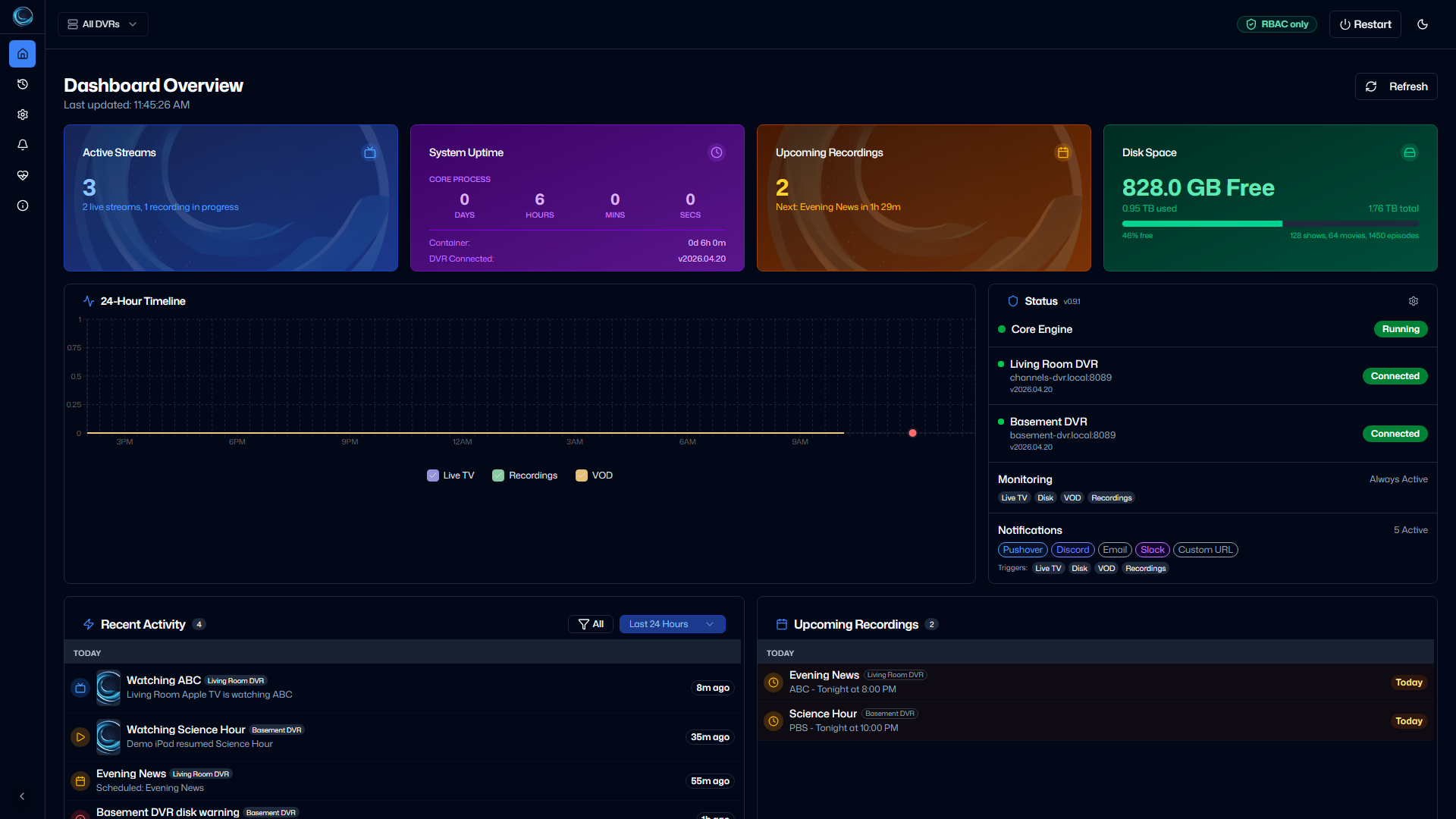
Most settings are configured through a responsive web dashboard at port 8501. Automation paths use `CHANNELS_DVR_SERVERS` or saved settings, while the Diagnostics tab lets you test alerts and verify connectivity in one click.
Dashboard
- Real-time active stream count and device list
- Upcoming recordings with channel and time
- Disk usage at a glance with visual indicator
- 24-hour activity timeline
Diagnostics
- One-click test for each alert type
- Connection and API endpoint checks
- Live container log tail
- Report a Problem with sanitized diagnostics
- System info and version display
Deployment profile
ChannelWatch is packaged for simple home-lab operation: one container, one persisted config volume, and health probes for orchestrators that need them.
1 container
UI and monitor in one image
/config
Settings, logs, backups, and local state
amd64 + arm64
Published Docker platforms
1 replica
Supported Helm runtime in v1.5.3
CPU and memory use depend on DVR count, event volume, enabled providers, and host hardware. For Kubernetes, set resource requests and limits to match your own node capacity and keep replicaCount at 1.
Start monitoring your Channels DVR today.
Deploy with Docker Compose, open the web UI, and finish the first-run wizard with your DVR and notification destination.