
Migrating from v0.7
ChannelWatch v1.5.3 is the current production release and includes the v0.9 multi-DVR configuration model. The upgrade flow is designed to be safe: migration runs automatically on startup, and a timestamped backup is written before ChannelWatch touches /config/settings.json.
What changes in v1.5.3
Section titled “What changes in v1.5.3”The most significant change for existing users is the move from a single-DVR configuration to the new dvr_servers list format. v1.5.3 supports multiple Channels DVR servers from one ChannelWatch instance, and the internal config schema was updated to reflect this.
Other notable changes:
- Legacy environment variables are no longer the preferred path: remove
CHANNELS_DVR_HOSTandCHANNELS_DVR_PORTfrom older compose files and confirm your DVR settings in the web UI after the upgrade. - SQLite activity database: Activity history is stored in
/config/channelwatch.dbin current releases. - Protected credential storage: current releases encrypt stored per-DVR API keys and custom webhook URL/secret fields with
/config/encryption.key. Other provider settings remain sensitive and still depend on filesystem protection.
How automatic migration works
Section titled “How automatic migration works”When ChannelWatch v1.5.3 starts against an existing v0.7 config directory, it:
- Reads the existing configuration from
/config/settings.json. - Writes a timestamped backup to
/config/backups/before any migration step runs. - Updates the on-disk configuration to the current release format.
- Starts the upgraded application with your migrated settings.
The app repo migration guide does not promise a separate manual migration command. The expected path is still pull the new image, start the container, and verify the app after startup.
The dvr_servers format
Section titled “The dvr_servers format”After migration, your settings.json will contain a dvr_servers list instead of the old top-level host and port fields. A simplified example looks like this:
{ "dvr_servers": [ { "id": "dvr_0123abcd", "name": "My DVR", "host": "192.168.1.100", "port": 8089, "enabled": true, "api_key": "", "overrides": {}, "deleted_at": null } ]}The dvr_servers list is the current settings shape used by v1.5.3-era docs and features. After the upgrade, confirm your DVR entry looks correct in the web UI instead of editing settings.json by hand.
You do not need to edit this file directly. The web UI manages dvr_servers through Settings > General > DVR Servers.
Legacy environment variables
Section titled “Legacy environment variables”If your v0.7 compose file still includes CHANNELS_DVR_HOST or CHANNELS_DVR_PORT, remove them during the upgrade and verify the DVR connection through the web UI after the container starts.
Rollback and version pinning
Section titled “Rollback and version pinning”The app repo migration guide recommends pinning production installs to a specific image tag and restoring a pre-upgrade backup before you start an older image. If you need to roll back after a bad upgrade:
- Stop the ChannelWatch container.
- Pin your compose file back to the last known-good image tag.
- Restore the matching backup from
/config/backups/over/config/settings.jsonif settings were changed by the upgrade. - Start the container again.
For production, prefer an immutable patch tag such as 1.3.0 over latest so you know exactly what version you can return to.
Step-by-step upgrade
Section titled “Step-by-step upgrade”1. Back up your config directory
Section titled “1. Back up your config directory”cp -r /your/local/path /your/local/path.backup-$(date +%Y%m%d)This is a precaution on top of the automatic backup. Keep it until you’re satisfied with v1.5.3.
2. Pull the v1.5.3 image
Section titled “2. Pull the v1.5.3 image”docker compose pullIf you prefer a pinned upgrade instead of latest, update your compose file first and use a specific tag such as coderluii/channelwatch:1.5.3.
3. Start the container
Section titled “3. Start the container”docker compose up -dWatch the logs during the first startup to confirm migration completes:
docker logs -f channelwatchYou should see the container start cleanly. If the older config needs migration, ChannelWatch will handle it during startup.
4. Verify in the web UI
Section titled “4. Verify in the web UI”Open http://your-server-ip:8501 and confirm:
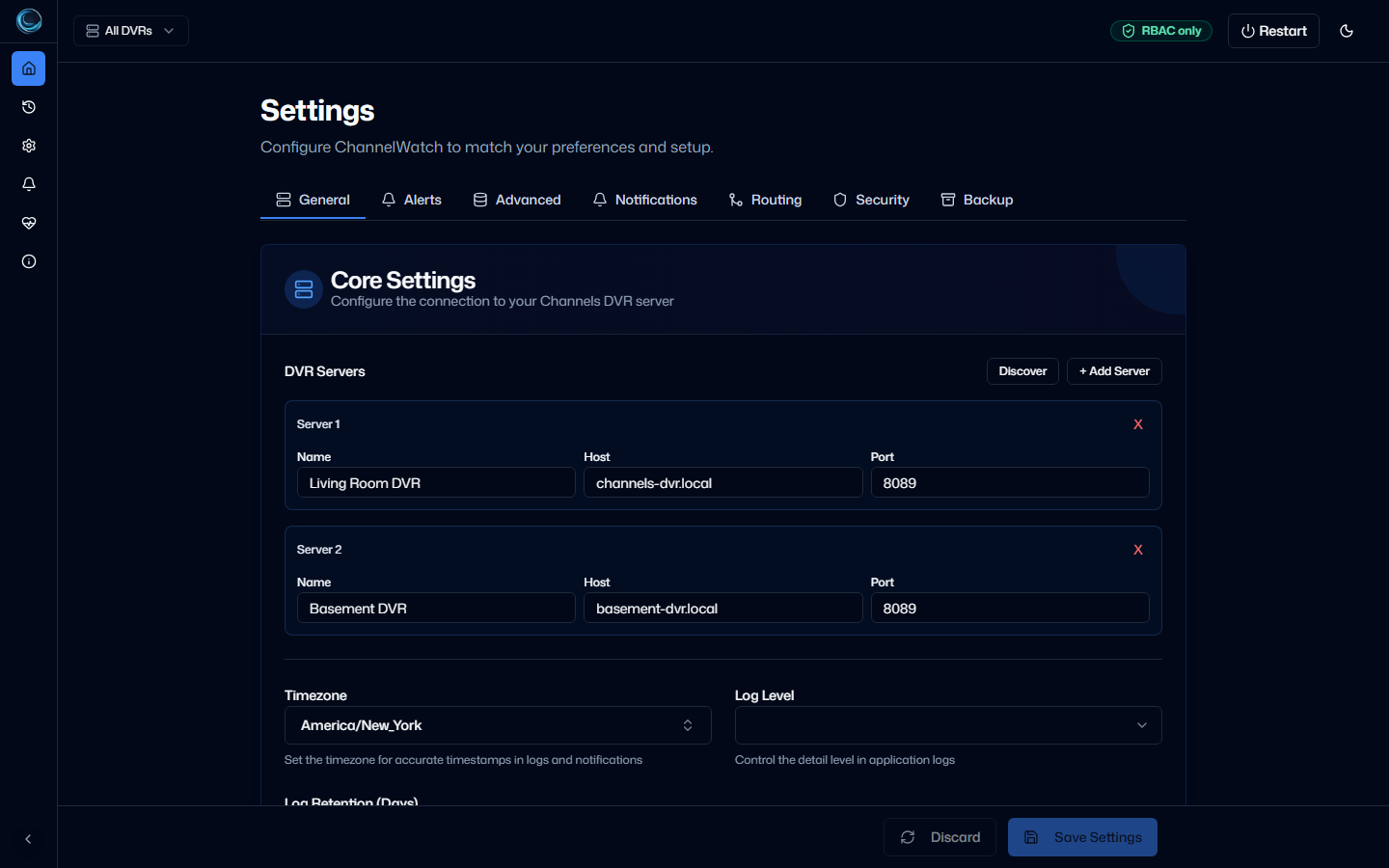
- Your DVR server appears under Settings > General > DVR Servers with the correct host and port.
- The dashboard shows a connected status.
- Your notification providers still look correct.
5. Remove legacy environment variables
Section titled “5. Remove legacy environment variables”Edit your docker-compose.yml and remove any CHANNELS_DVR_HOST or CHANNELS_DVR_PORT lines. Restart the container:
docker compose up -dTroubleshooting migration issues
Section titled “Troubleshooting migration issues”Migration warning in logs but app starts fine: verify the app in the web UI, then clean up any leftover legacy DVR env vars from your compose file.
App will not start after you pin back to an older image: restore the pre-upgrade backup from /config/backups/ before starting the older version. This matches the downgrade caveat in the app repo migration guide.
Missing settings after upgrade: double-check that the container is still mounted to the same /config directory you used before the upgrade, then restore from your manual backup or the timestamped backup in /config/backups/ if needed.
Need exact tag guidance: use a full MAJOR.MINOR.PATCH tag such as 1.3.0 for an immutable release. latest tracks the newest stable release. ChannelWatch does not publish a rolling MAJOR.MINOR image alias.
Next steps
Section titled “Next steps”- First-Run Configuration - verify your settings after migration
- Multi-DVR Setup - add additional Channels DVR servers
- Troubleshooting - fix common post-upgrade issues