
Delivery Log
The delivery log records notification delivery attempts in ChannelWatch’s database. It shows when a send succeeded, when a retry was scheduled, when retries were exhausted, and when a circuit was open and the send was skipped.
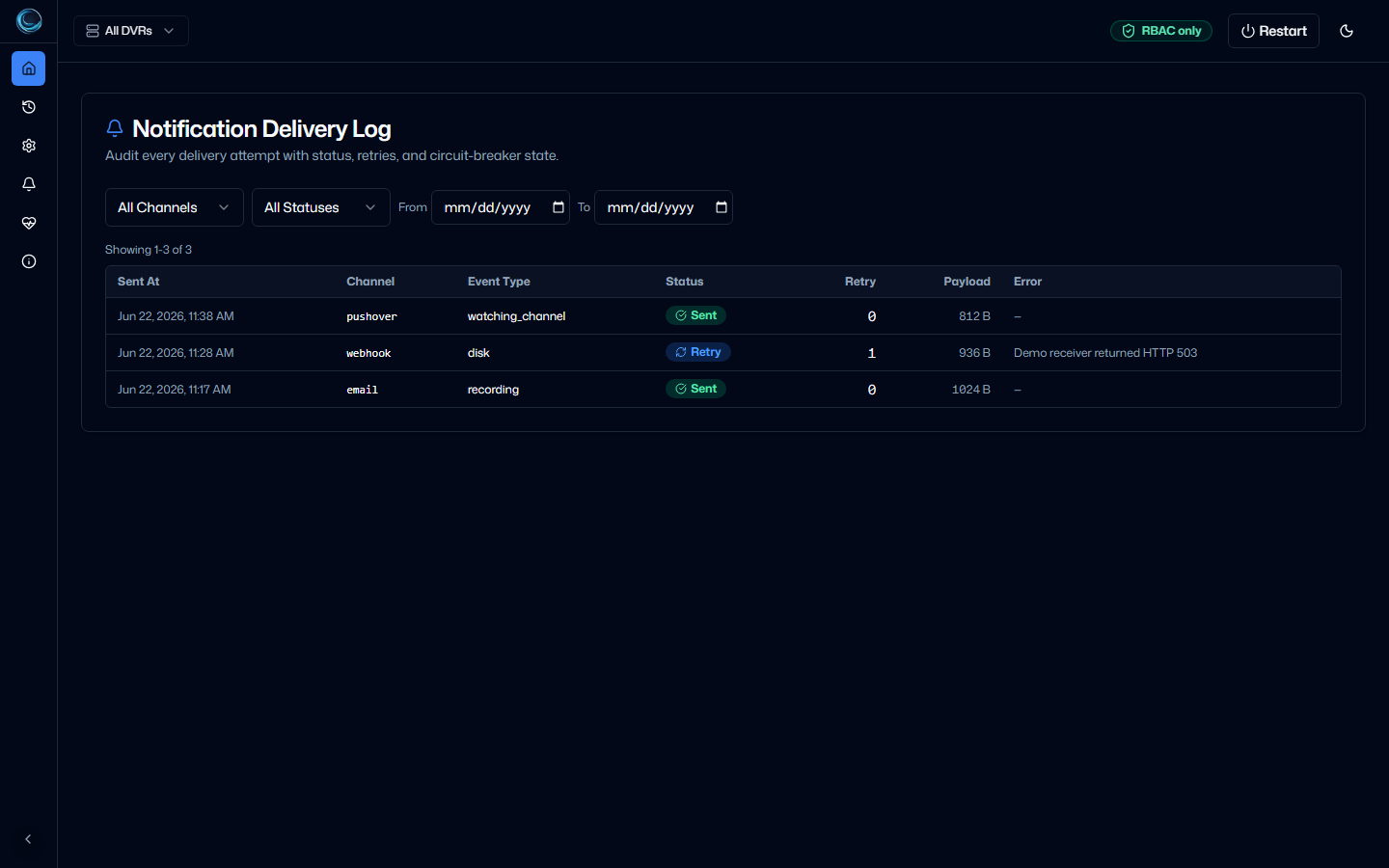
The log is most useful when you are answering questions like these:
- Did this alert send successfully?
- Did ChannelWatch retry it or fail immediately?
- Is one provider path currently being skipped because its circuit is open?
What each row shows
Section titled “What each row shows”The delivery records stored by ChannelWatch include these fields:
| Column | Description |
|---|---|
| Time | When the attempt was recorded |
| DVR | Which DVR server triggered the alert |
| Channel | Which delivery path was used, such as an Apprise-backed provider or webhook |
| Event type | Which alert type triggered the send |
| Status | sent, retry, failed, or circuit_open |
| Retries | Retry count for that recorded attempt |
| Error | The captured error message when one was available |
ChannelWatch stores one row per recorded attempt, not one row per alert. A single alert can produce several rows if retries happen.
Retry behavior
Section titled “Retry behavior”When the retry helper is enabled for a delivery path, ChannelWatch uses these retry delays:
| Attempt | Delay before retry |
|---|---|
| 1st retry | 2 seconds |
| 2nd retry | 4 seconds |
| 3rd retry | 8 seconds |
| 4th retry | 16 seconds |
| 5th retry | 32 seconds |
That means a retry-enabled path can record up to six attempts for one send, the initial attempt plus five retries.
Some delivery paths can be configured without retries. In those cases, the first failed attempt is recorded as failed instead of retry.
Retry and circuit state are tracked per (dvr_id, channel) pair. A problem with one DVR or one channel does not automatically open the circuit for a different DVR or a different channel.
Circuit breaker
Section titled “Circuit breaker”The circuit breaker prevents repeated attempts against a delivery path that is already failing.
Current v1.5.3 behavior in the retry helper is:
- After 5 consecutive failures on a
(DVR, channel)pair, the circuit opens. - While open, ChannelWatch skips delivery attempts for that pair and logs the status as
circuit_open. - After 5 minutes, the circuit closes automatically and delivery resumes.
- A successful send resets the failure counter for that
(DVR, channel)pair.
Rows with status circuit_open mean ChannelWatch skipped the delivery attempt because the circuit was open at that moment.
Retention
Section titled “Retention”Delivery-log rows are stored in channelwatch.db and pruned by the nightly maintenance job.
The retention window is tied to ChannelWatch’s configured history retention, not a hardcoded 30-day delivery-log limit. In the current source, the default history retention is 90 days unless you change it in settings.
Status reference
Section titled “Status reference”| Status | Meaning |
|---|---|
sent |
Delivery succeeded |
retry |
Delivery failed and another retry-enabled attempt is scheduled |
failed |
Delivery failed and no more attempts will be made for that send |
circuit_open |
Delivery was skipped because the circuit was already open for that (DVR, channel) pair |
Troubleshooting
Section titled “Troubleshooting”Repeated failed rows for one channel
Section titled “Repeated failed rows for one channel”Check the error column for the specific failure reason. Common causes:
- Invalid credentials, webhook URL deleted, API token revoked, or bot removed from the channel. Update the provider settings and test again.
- Network unreachable, the ChannelWatch container cannot reach the destination service. Verify DNS and outbound connectivity from the container.
- Provider-side rejection, the remote service rejected the request. Check the provider’s own limits and error text.
Circuit breaker keeps reopening
Section titled “Circuit breaker keeps reopening”If the circuit opens, closes, and opens again repeatedly, the underlying delivery problem still exists. Fix the root cause instead of waiting for the circuit window to cycle.
Log is empty
Section titled “Log is empty”The delivery log only contains attempts that were recorded after the delivery table and storage path were active in your current install. Trigger a test notification from the diagnostics tools to confirm delivery is working and create a fresh row.
Related pages
Section titled “Related pages”- Provider Plugins , add third-party notification providers
- Discord , Discord webhook setup
- Diagnostics , test and verify your notification setup
- Hot Reload , apply notification config changes without restarting