
Multi-DVR Overview
ChannelWatch v1.5.3 can monitor multiple Channels DVR servers from a single running instance. Each server is tracked independently - its own event stream, its own session state, its own notification routing, and its own metrics labels. Nothing bleeds across servers by default.
What “multi-DVR” means
Section titled “What “multi-DVR” means”In v0.7, ChannelWatch connected to exactly one Channels DVR server, configured via environment variables. Starting in v0.9.0, that model was replaced by a list of DVR server entries managed through the web UI, CHANNELS_DVR_SERVERS, or the saved /config/settings.json file. You can add, remove, enable, and disable servers from the UI; the UI save path signals the core process to reload affected monitors.
The core has an asyncio entry point and per-DVR task groups, but v1.5.3 still uses a mixed runtime where part of event monitoring runs through internal threads. If one DVR goes offline, ChannelWatch handles that DVR independently rather than treating every DVR as one shared connection.
Think of it this way: ChannelWatch is the single process you run. The DVR servers are the things it watches. You manage one container; it manages many servers.
DVR identity: the canonical ID
Section titled “DVR identity: the canonical ID”Every DVR server in ChannelWatch has a stable, system-derived identifier computed as:
dvr_id = md5(host:port)[:8]For example, a server at 192.168.1.10:8089 gets the ID a3f2c1b4. This ID is:
- Stored in
settings.jsonalongside the server’s display name and connection details - Used as the key in all internal state maps (session tracking, alert history, dedup tables)
- Included as a label on every Prometheus metric (
dvr_id="a3f2c1b4") - Appended to per-DVR API endpoint paths (
/api/v1/dvrs/a3f2c1b4/health)
The ID is derived from the connection address, not from the display name. Renaming a server in the UI does not change its ID. Changing the host or port creates a new ID and a new independent state record. Any routing rules or alert history tied to the old ID are orphaned when the address changes.
Per-DVR state isolation
Section titled “Per-DVR state isolation”ChannelWatch keeps the following state independently for each DVR:
| State | Scope | Description |
|---|---|---|
| Event stream connection | Per-DVR | Each DVR has its own SSE connection and reconnect loop |
| Session tracking | Per-DVR | Active streams are tracked per-DVR; a session on DVR-A does not affect DVR-B |
| Alert deduplication | Per-DVR | Dedup is fully per-DVR by default; no cross-DVR suppression |
| Notification routing | Per-DVR | Each DVR can route different event types to different notification channels |
| Prometheus metrics | Per-DVR | All gauges and counters carry a dvr_id label |
| Health endpoint | Per-DVR | /api/v1/dvrs/<id>/health reports status for that server only |
This isolation means you can safely monitor a production DVR and a test DVR from the same ChannelWatch instance without their alerts or session counts interfering with each other.
What isolation means in practice
Section titled “What isolation means in practice”Isolation is about state, not about the process itself. ChannelWatch is still one process. The isolation is logical: each DVR’s data lives in its own keyed slot inside the shared process.
A few concrete examples of what this means:
- A stream starting on DVR-A does not increment the session count shown for DVR-B.
- An alert fired by DVR-A goes through DVR-A’s routing rules, not DVR-B’s.
- If DVR-A’s event stream drops and reconnects, DVR-B’s stream is unaffected.
- Deduplication history for DVR-A does not suppress alerts from DVR-B, even if the alert content is identical.
What is shared across all DVRs
Section titled “What is shared across all DVRs”Not everything is per-DVR. Some things are global to the ChannelWatch instance:
- Provider destinations. The Pushover account, Discord webhook URL, Gotify server, or any other notification provider you configure is shared across all DVRs. You cannot send DVR-A alerts to one Pushover account and DVR-B alerts to a different Pushover account from the same ChannelWatch instance. The routing matrix controls which event types from which DVRs reach which provider types, not which provider account or instance receives them.
- Settings storage. All DVR entries live in the same
/config/settings.jsonfile. There is one config volume, one settings file, and one web UI managing all servers. - The web UI itself. Authentication, the dashboard, and the settings panel are shared. There is no per-DVR login or per-DVR admin panel.
- The ChannelWatch process. One container, one process, one restart affects all DVRs simultaneously.
If you need truly separate provider accounts per DVR, the only supported path is running a separate ChannelWatch instance for each DVR.
How routing fits into the model
Section titled “How routing fits into the model”The routing matrix in ChannelWatch lets you control which event types from each DVR reach which provider types. For example, you can send recording events from DVR-A to Discord and recording events from DVR-B to Pushover. That is per-DVR routing.
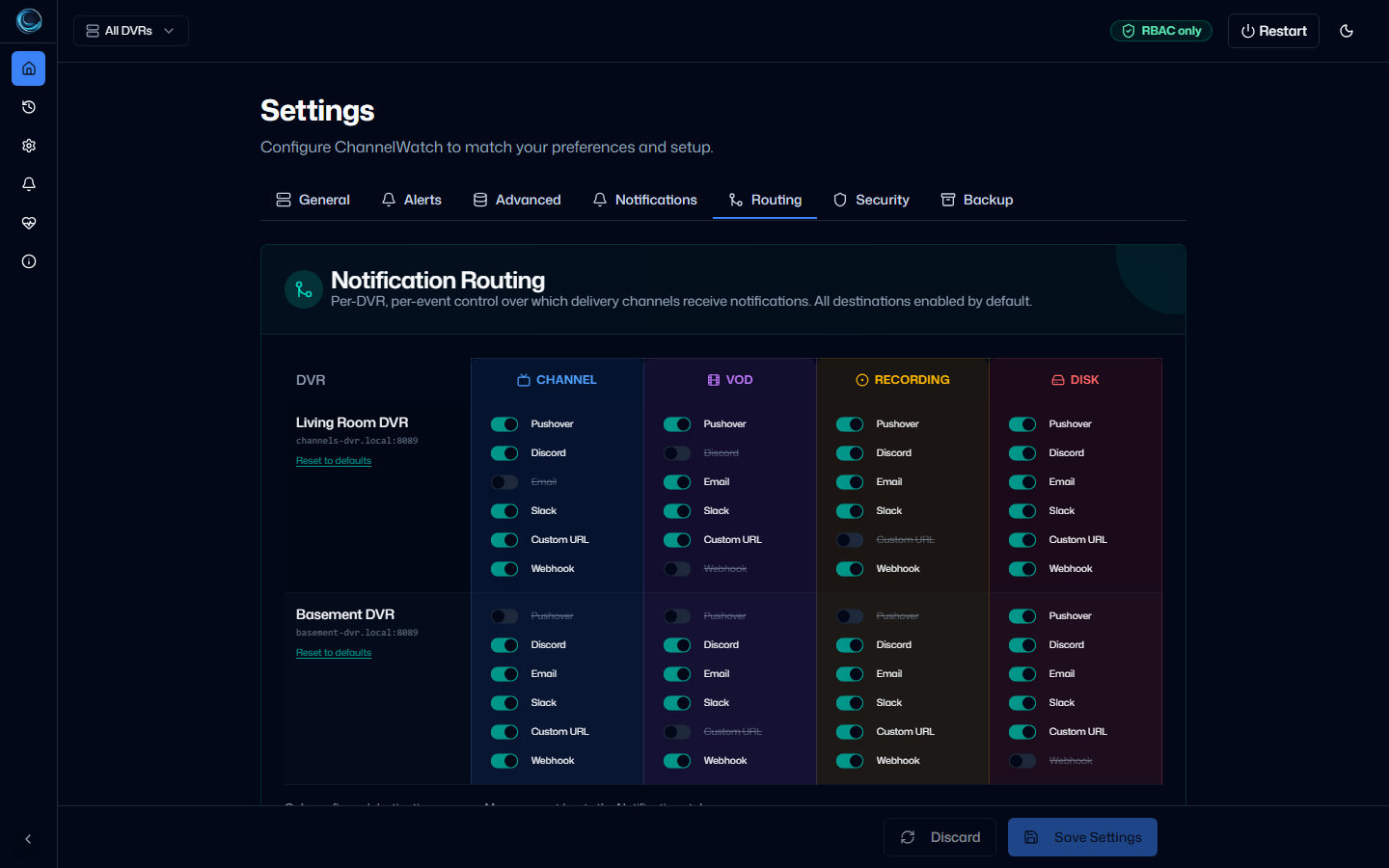
What the routing matrix does not control is which account or instance of a provider receives the alert. If you have one Pushover application key configured, all Pushover alerts from all DVRs go to that same key. The matrix routes by event type and DVR, not by provider account.
This distinction matters when you are planning a multi-DVR setup. If your goal is to separate alerts by DVR into completely different notification destinations (different Pushover users, different Discord servers), you need separate ChannelWatch instances, not just separate routing rules.
See Per-DVR Notification Routing for the full routing matrix reference.
Aggregate views
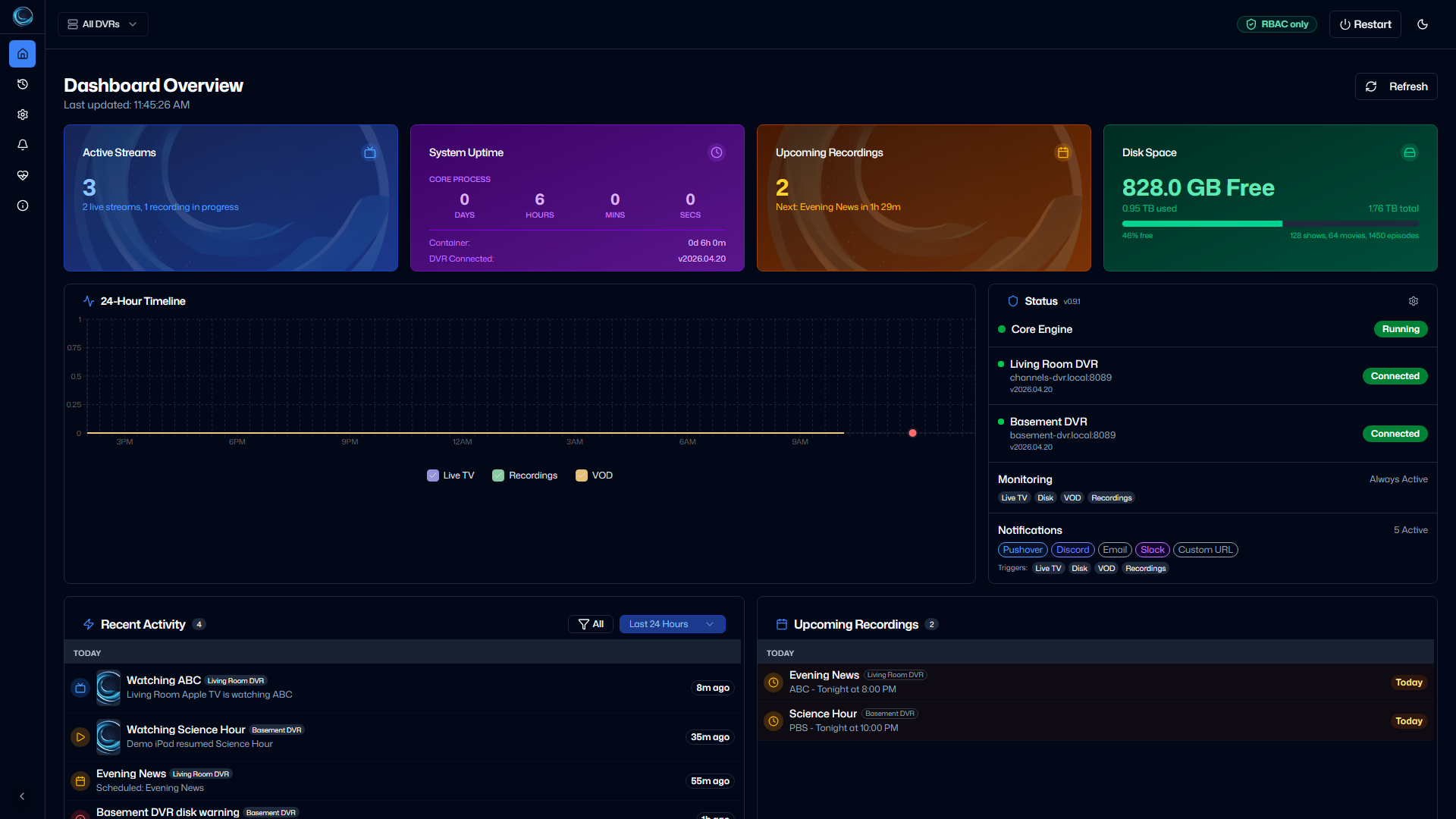
Section titled “Aggregate views”The dashboard defaults to an aggregate view that combines activity across all DVRs. A server switcher in the top navigation lets you filter to a single DVR. Notifications always include the server’s display name so you know which DVR triggered an alert.
Prometheus metrics expose both per-DVR series (with dvr_id label) and aggregate series (without the label) for backwards compatibility with existing dashboards.
Reading the dashboard with multiple DVRs
Section titled “Reading the dashboard with multiple DVRs”When you are looking at the aggregate view, the session count shown is the total across all enabled DVRs. A single stream on DVR-A and a single stream on DVR-B shows as two active sessions in the aggregate. Switching to a single DVR in the server switcher scopes all counts and activity to that server only.
Alert history in the aggregate view is interleaved by timestamp. Each alert entry includes the DVR display name so you can tell at a glance which server generated it. There is no separate alert log per DVR; the display name is the only per-DVR signal in the shared log.
Scale limits
Section titled “Scale limits”ChannelWatch logs a soft warning when more than 10 enabled DVRs are configured. Larger setups may work, but v1.5.3 does not include a UI scale warning or override control. Treat more than 10 DVRs as an advanced setup that needs extra monitoring.
In practice, the bottleneck for large server counts is the number of concurrent event streams and the volume of events being processed. A DVR that generates high event volume (frequent recordings, many concurrent streams) consumes more processing time than a quiet DVR. There is no per-DVR resource cap; all DVRs share the same process resources.
What not to expect
Section titled “What not to expect”Multi-DVR in v1.5.3 is designed for a single operator managing multiple Channels DVR servers from one place. It is not designed for:
- High-availability failover. If the ChannelWatch container goes down, monitoring stops for all DVRs simultaneously. There is no standby instance.
- Per-DVR user accounts. All users of the ChannelWatch web UI see all DVRs. There is no per-DVR access control in v1.5.3.
- Cross-DVR deduplication. If the same alert fires on DVR-A and DVR-B at the same time, both alerts are sent. Dedup is per-DVR only.
- Shared session state across instances. If you run two ChannelWatch instances pointing at the same DVR, they track sessions independently and will double-count.
v1.5.3 limits to know
Section titled “v1.5.3 limits to know”CHANNELS_DVR_SERVERSis supported for environment bootstrap, butCW_DVR_<N>_*and/config/dvrs.yamlare deferred.- Legacy
CHANNELS_DVR_HOSTandCHANNELS_DVR_PORTstill work with startup warnings. - A separate user-editable
display_namefield is deferred; v1.5.3 primarily usesname. - Mock DVR cluster tests exist, but real Channels DVR is not part of CI.
- Multi-replica high availability is not supported.
Next steps
Section titled “Next steps”- Adding DVR Servers - add and manage servers through the web UI
- Environment Bootstrap Config - use the supported
CHANNELS_DVR_SERVERSbootstrap path - mDNS Auto-Discovery - let ChannelWatch find Channels DVR servers on your LAN automatically
- Per-DVR Notification Routing - send different alerts to different channels per server