
Webhooks
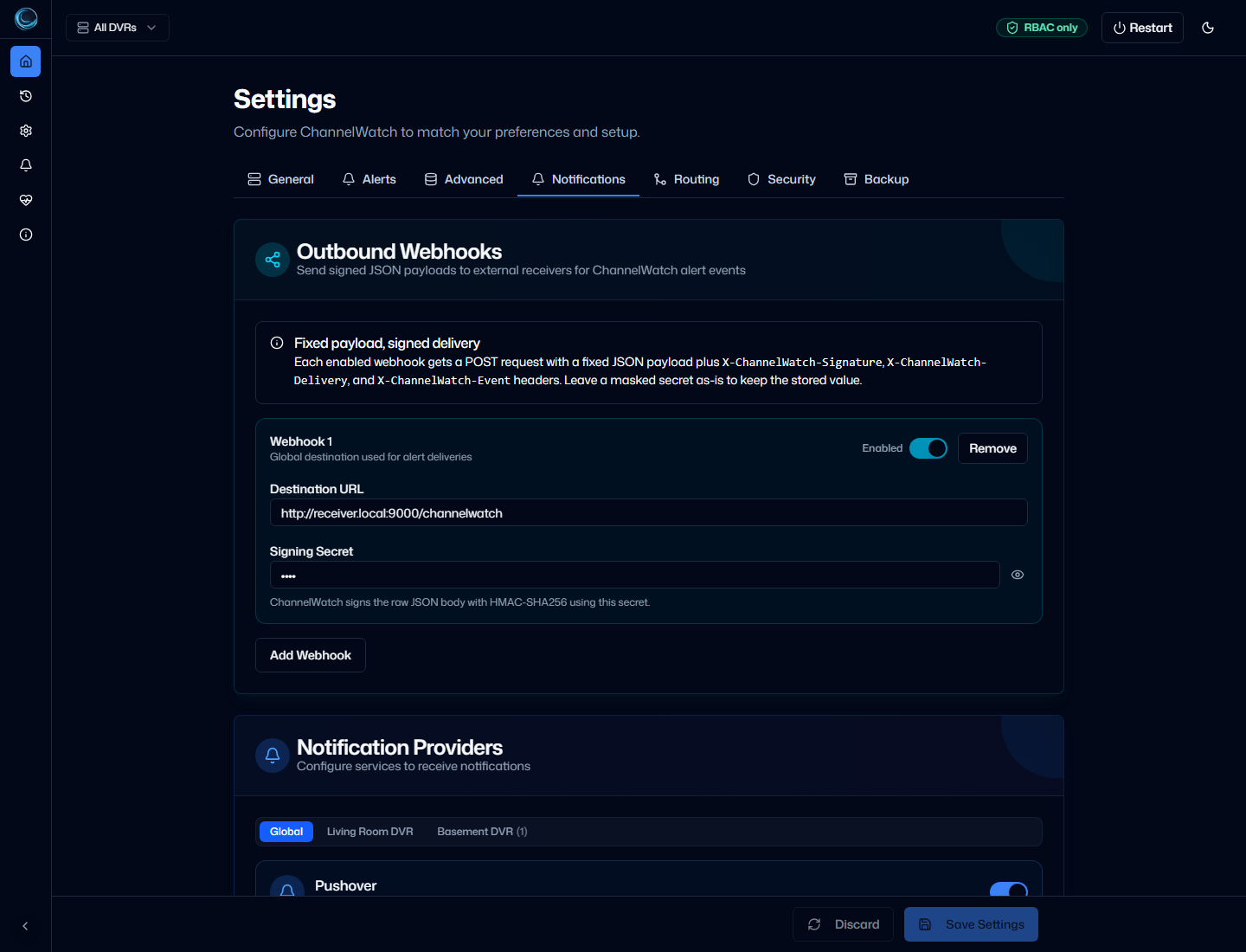
ChannelWatch can send notifications to your own HTTP endpoint as outbound webhooks. This is a separate notification surface from Custom (Apprise) and Provider Plugins. Use webhooks when you want ChannelWatch to POST a signed JSON payload to another system you control.
What webhooks are
Section titled “What webhooks are”Each enabled webhook sends an HTTP POST request to the URL you configure. ChannelWatch includes a JSON body, an event type, a delivery ID, and an HMAC signature header so your receiver can verify that the request came from a sender that knows the shared secret.
ChannelWatch sends webhooks only when a webhook entry is enabled and has both a URL and a secret. If the secret is missing, delivery is skipped.
How ChannelWatch signs webhook requests
Section titled “How ChannelWatch signs webhook requests”ChannelWatch signs the raw request body with HMAC-SHA256 and sends the result in the X-ChannelWatch-Signature header.
- Algorithm:
HMAC-SHA256 - Signature header:
X-ChannelWatch-Signature - Format:
sha256=<hex-digest>
Two additional headers are included on every request:
X-ChannelWatch-Delivery: the per-request delivery IDX-ChannelWatch-Event: the event type, such astestorrecording.started
Configuring a webhook endpoint
Section titled “Configuring a webhook endpoint”In ChannelWatch, each webhook entry contains three fields:
url: the destination endpointsecret: the shared secret used for HMAC signingenabled: whether ChannelWatch should send to that endpoint
Your receiving service should:
- Accept
POSTrequests with a JSON body - Read the
X-ChannelWatch-Signatureheader - Recompute the HMAC with the same shared secret
- Compare the computed value with the received signature using a constant-time comparison
- Return a
2xxresponse when the payload is accepted
If your receiver depends on links back to the ChannelWatch instance, set one of these environment variables on the ChannelWatch side so instanceUrl in the payload uses the correct public URL:
CHANNELWATCH_INSTANCE_URLCW_INSTANCE_URLAPP_URL
If none of those variables are set, ChannelWatch uses http://localhost:8501 as the fallback instanceUrl value.
Verifying the HMAC signature
Section titled “Verifying the HMAC signature”The verification flow is the same in every language:
- Read the raw request body as bytes
- Compute
HMAC-SHA256(secret, body) - Prefix the hex digest with
sha256= - Compare it to
X-ChannelWatch-Signature
Example: Node.js
Section titled “Example: Node.js”import crypto from 'node:crypto';
function verifyChannelWatchSignature(rawBody, signatureHeader, secret) { const expected = 'sha256=' + crypto.createHmac('sha256', secret).update(rawBody).digest('hex');
const received = Buffer.from(signatureHeader || '', 'utf8'); const computed = Buffer.from(expected, 'utf8');
if (received.length !== computed.length) { return false; }
return crypto.timingSafeEqual(received, computed);}Example: Python
Section titled “Example: Python”import hashlibimport hmac
def verify_channelwatch_signature(raw_body: bytes, signature_header: str, secret: str) -> bool: expected = "sha256=" + hmac.new( secret.encode("utf-8"), raw_body, hashlib.sha256, ).hexdigest()
return hmac.compare_digest(signature_header or "", expected)Payload format
Section titled “Payload format”ChannelWatch sends a JSON object with this shape:
{ "eventType": "notification", "timestamp": "2026-04-21T00:00:00Z", "instanceName": "ChannelWatch", "instanceUrl": "http://localhost:8501", "version": "1.5.3", "deliveryId": "550e8400-e29b-41d4-a716-446655440000", "dvr_id": "dvr_1234", "dvr_name": "Living Room", "data": { "title": "Test title", "message": "Test message", "imageUrl": null }}Field meanings:
eventType: the normalized event name chosen by ChannelWatchtimestamp: when the payload was generated, in UTC ISO 8601 formatinstanceName: the ChannelWatch app nameinstanceUrl: the configured instance URL, orhttp://localhost:8501if no instance URL env var is setversion: the ChannelWatch version stringdeliveryId: a unique ID for this webhook attemptdvr_id: the DVR ID tied to the alert, when availabledvr_name: the DVR display name tied to the alert, when availabledata.title: the notification titledata.message: the notification message bodydata.imageUrl: an image URL when present, otherwisenull
Current webhook event types include these values:
testchannel.watching.startvod.playback.startdisk.space.warningdisk.space.criticalrecording.scheduledrecording.startedrecording.cancelledrecording.completedrecording.updatedalert.notificationnotification
Troubleshooting
Section titled “Troubleshooting”Signature verification fails
Section titled “Signature verification fails”Check these first:
- Make sure your receiver uses the raw request body bytes, not parsed JSON that has been serialized again.
- Verify that your shared secret exactly matches the secret configured in ChannelWatch.
- Confirm that you’re reading
X-ChannelWatch-Signature, notX-ChannelWatch-DeliveryorX-ChannelWatch-Event. - Make sure your comparison includes the
sha256=prefix.
If you rotate the webhook secret in ChannelWatch, update the receiving service at the same time. Old signatures will stop matching immediately.
No POST received
Section titled “No POST received”ChannelWatch attempts each webhook up to 3 times. Each request uses a 5 second timeout, with exponential retry delays of 1 second and 2 seconds between retries.
If your endpoint still receives nothing:
- Confirm the webhook entry is enabled.
- Confirm the destination URL is correct and reachable from the ChannelWatch container.
- Confirm a secret is configured. ChannelWatch skips delivery when the secret is missing.
- Send a test notification, then review the Delivery Log and container logs for timeout or HTTP status errors.
Related pages
Section titled “Related pages”- Custom (Apprise) for third-party notification services that already have an Apprise URL scheme
- Delivery Log to inspect webhook attempts and failures
- Provider Plugins if you need custom Python delivery logic instead of an HTTP endpoint